

Template: Shopify to Dynamics 365 - Customers
Summary
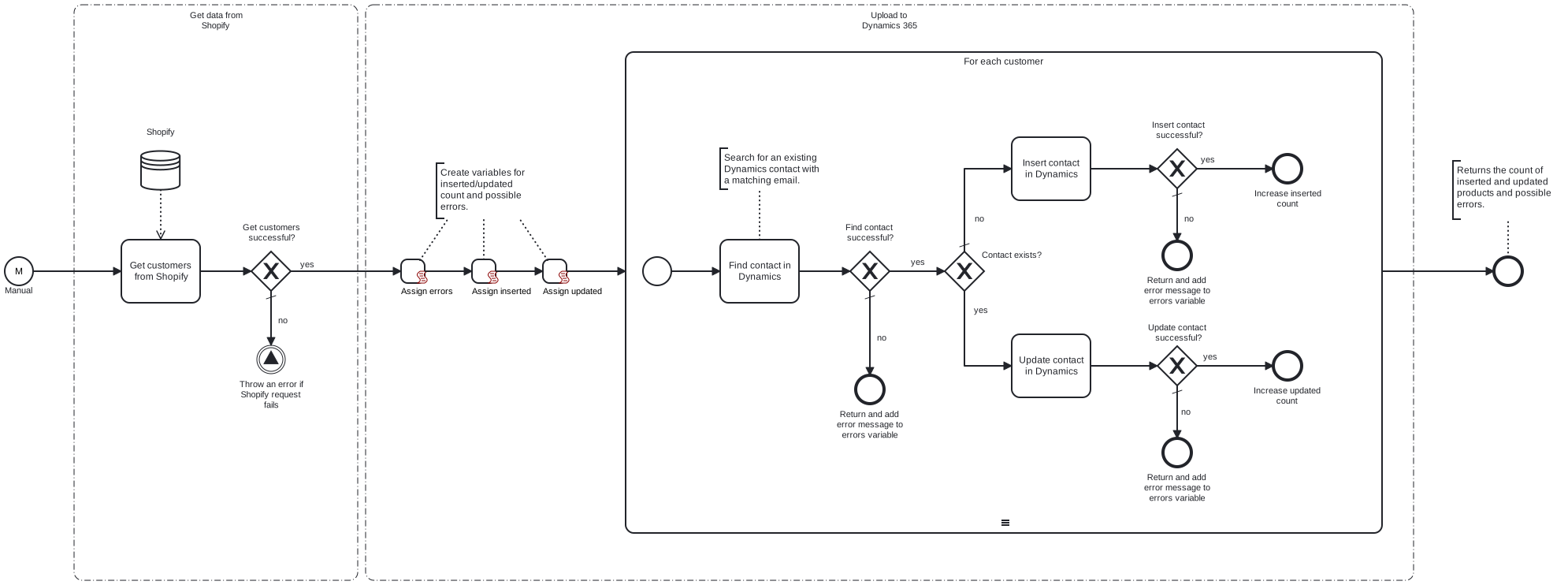
This template retrieves customers from Shopify and either inserts or updates them in Dynamics 365 as contacts.
Prerequisites
This template assumes that the following prerequisites are in place:
- The Shopify API key is properly configured with the necessary permissions to retrieve data through the API.
- Dynamics 365 user has permissions to insert and update data.
Implementation and Usage Notes
This template requests customer data from the Shopify API and saves each customer as a contact in Dynamics 365. If a Dynamics contact with a matching email is found, the contact data is updated. Otherwise, the template inserts the customer data as a new contact. The credentials for accessing both APIs are configured with the process variables.
Error Handling
This template does not handle transient errors separately. Requests to Shopify and Dynamics 365 are checked for errors. If any errors are encountered while processing a single customer, the process continues to the next one, and the error is added to the result message.
Template Process Variables
| Name | Description |
|---|---|
| ShopifyUrl | The base URL for accessing the Shopify API. |
| ShopifyAccessTokenSecret | The access token for the Shopify API. |
| DynamicsClientId | The ID for Dynamics 365 client. |
| DynamicsTenantId | The ID for Dynamics 365 tenant. |
| DynamicsClientSecretSecret | The secret key for Dynamics 365 client. |
| DynamicsUrl | The Dynamics 365 instance URL. |