

Template: Salesforce account synchronization to Microsoft SQL database
Summary
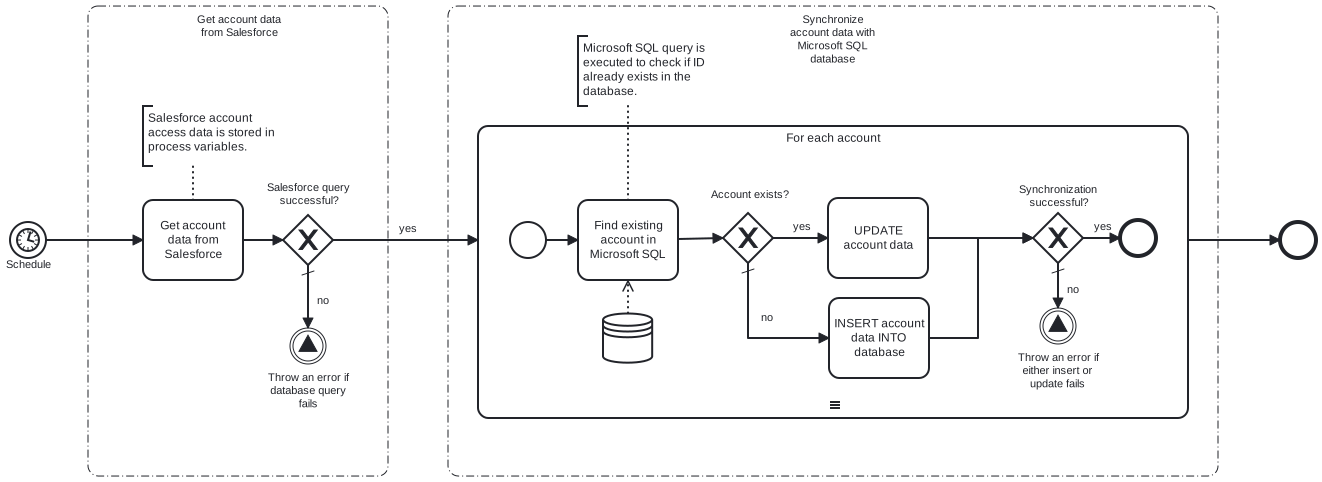
This template synchronizes Salesforce account information with Microsoft SQL database table. Using this template, you can insert and update Salesforce account information to Microsoft SQL database on a schedule.
Prerequisites
This template assumes that the following prerequisites are in place:
- The Salesforce user should have access to client ID, secret and security token.
- The Microsoft SQL user has permissions to write data in the table specified in the query.
Implementation and Usage Notes
This template uses SQL queries for update and insert. Other queries are not implemented in this template, e.g. for handling deleted or deactivated accounts. Process variables include fields for Salesforce credentials, Microsoft SQL table name and connection string.
Error Handling
Error handling is not implemented in this template. However, if transient errors are expected, retries for Salesforce connection and database queries can be enabled from the tasks.
Template Process Variables
| Name | Description |
|---|---|
| AccountTableName | Microsoft SQL database table name. |
| ConnectionStringSecret | Connection string required to access Microsoft SQL database. |
| ClientId | Your Salesforce client id, required to access your account. |
| ClientSecretSecret | Your Salesforce client secret, required to access your account. |
| Username | Your username to access Salesforce. |
| PasswordSecret | Salesforce account password linked to username. |
| SecurityTokenSecret | Salesforce security token. |