


Template: Generic JSON Order File to Salesforce
Summary
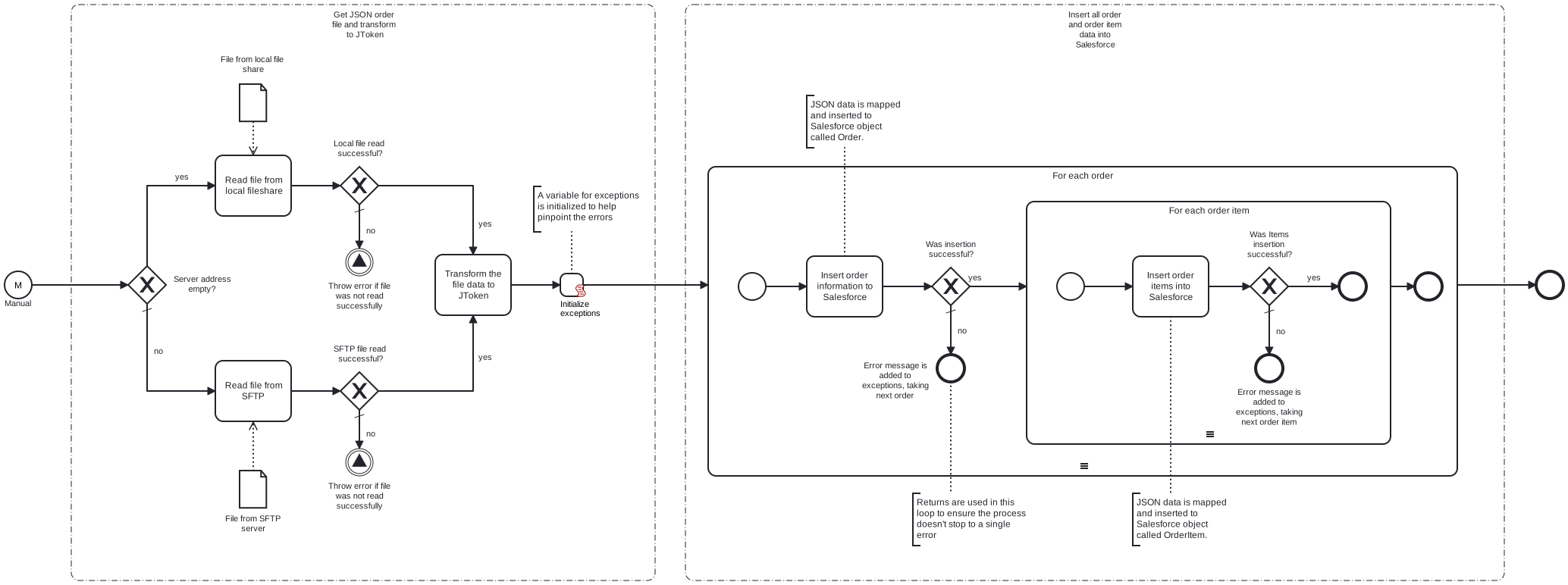
This template will retrieve an order file from a local file system or an SFTP server. It will perform the necessary mapping to Salesforce Order format, and transfer the mapped orders to Salesforce. Using this template, you can insert new orders to Salesforce.
Prerequisites
This template assumes that the following prerequisites are in place:
- If SFTP connection is used, username and password for the server are required.
- The Salesforce user should have access to client ID, secret and security token.
- In order to create new entries in Order and Order Product, there should be usable accounts, contacts, products, price books and price book entries in Salesforce.
Implementation and Usage Notes
This template is used to insert order data to Salesforce using Salesforce Order and Order Product objects. Other properties, such as activation, deactivation and deletion is not implemented in this template. Process variables include fields for Salesforce and SFTP credentials, file path and file name.
Error Handling
Error handling is not implemented in this template. However, if transient errors are expected, retries for reading the file, data transform and Salesforce insertion can be enabled from their tasks.
Template Process Variables
| Name | Description |
|---|---|
| InServerAddress | IP address for the SFTP server. |
| InServerUser | User for the input SFTP Server. |
| InServerPasswordSecret | Password the input SFTP Server. |
| InFilePath | Full path of the input file to be read. |
| InFileName | Name of the input file to be read. |
| SalesforceBaseURL | The base URL for the Salesforce API. |
| SalesforceAuthURL | The Authorisation URL for the Salesforce API. |
| SalesforceUser | The User for Salesforce API. |
| SalesforcePasswordSecret | The Password for Salesforce API. |
| SalesforceClientId | The client id for Salesforce API. |
| SalesforceClientSecretSecret | The client secret for Salesforce API. |
| SalesforceSecurityTokenSecret | Security Token for Authorisation. |