


Template: Microsoft SQL SELECT to CSV with SFTP upload
Summary
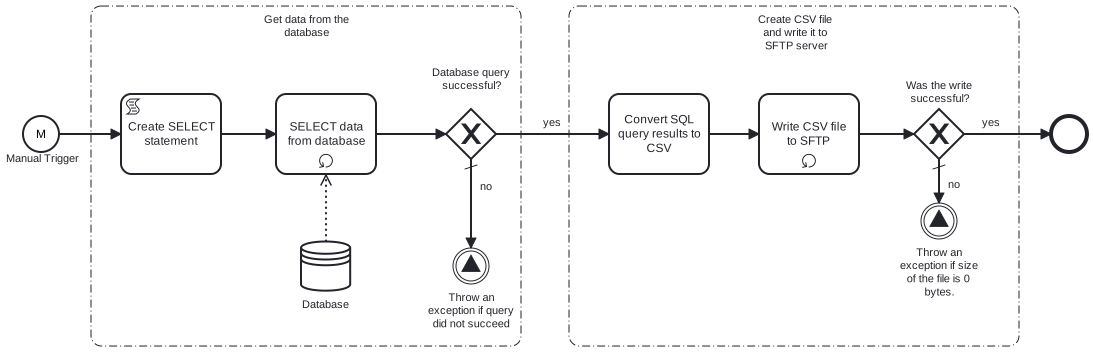
This template generates CSV data from Microsoft SQL Server. Using this template, you can create a CSV file by fetching data from Microsoft SQL Server, and then transform it into CSV file which will be saved on SFTP server.
Prerequisites
This template assumes that the following prerequisites are in place:
- The Microsoft SQL user has permissions to read data from the tables specified in the query.
- The SFTP server user should have the permissions to connect and write the files that Frends needs to upload.
Implementation and Usage Notes
This template creates a new CSV file based on the data from the SQL query. The variable SelectionCriteria provides the possibility to add conditions to the SELECT statement. In case of already existing file in SFTP server path, old file will be overwritten.
Error Handling
Connection to Database and SFTP server is retried three time before failing. Any other error related to conversion process is not handled by the process.
Template Process Variables
| Name | Description |
|---|---|
| TableName | Name of the database table. |
| ColumnNames | A comma-separated list of columns from which data will be selected. |
| SelectionCriteria | The criteria to select the record(s) from the table. |
| ConnectionStringSecret | Connection string to access the database. |
| ServerAddress | SFTP server address. |
| ServerUser | SFTP server user. |
| ServerPasswordSecret | SFTP server user's password. |
| Directory | Directory for files uploaded on SFTP server |
| FileName | Name of the file to be written on SFTP server. |