Azure Table Storage
Summary
Frends offers seamless integration with Azure Table Storage, enabling you to effortlessly connect and automate data flows involving Azure Table Storage tables and entities.
Frends provides tasks for performing all core Azure Table Storage operations, including creating, listing and deleting tables, and inserting, reading, querying, updating and deleting entities.
By leveraging Frends' task-based approach, you can configure and customize Azure Table Storage integrations according to your specific requirements. Frends offers a wide range of tasks that facilitate integrations to a variety of systems and protocols.
Use cases
Below you will find typical use cases for Azure Table Storage integrations and how they are implemented in Frends.
Create a table and load data into it
By using the CreateTable task, we can make sure the target table exists before any data is written. After that, the InsertEntities task writes the entities to the table in transactions. With the upsert modes of InsertEntities, the same integration can be safely run again if a previous run was interrupted.

Read and update entities
By using the QueryEntities task, we can retrieve entities that match a filter page by page, or by using the GetEntity task, we can read a single entity by its keys. After modifying the data, the UpdateEntities task writes the changes back. The odata.etag returned by the read tasks can be passed to UpdateEntities, so an update fails instead of overwriting changes made by someone else in the meantime.

Clean up old data
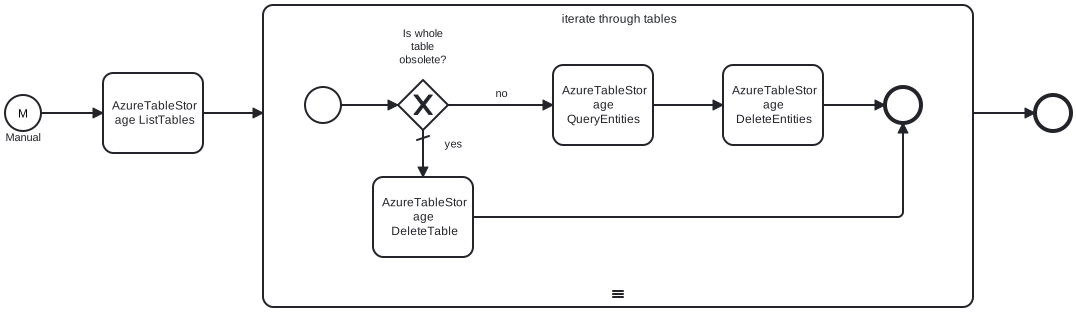
By using the ListTables task, we can find tables by a name prefix, for example temporary or monthly tables. The QueryEntities task finds the entities that are no longer needed and the DeleteEntities task removes them. When a whole table is obsolete, the DeleteTable task removes the table itself.